



Reporters
Vitest provides several built-in reporters to display test output in different formats, as well as the ability to use custom reporters. You can select different reporters either by using the --reporter command line option, or by including a reporters property in your configuration file. If no reporter is specified, Vitest auto-selects reporters based on the environment.
Using reporters via command line:
npx vitest --reporter=verboseUsing reporters via vitest.config.ts:
import { defineConfig } from 'vitest/config'

export default defineConfig({
  test: {
    reporters: ['verbose']
  },
})
Some reporters can be customized by passing additional options to them. Reporter specific options are described in sections below.
export default defineConfig({
  test: {
    reporters: [
      'default',
      ['junit', { suiteName: 'UI tests' }]
    ],
  },
})
Default Configuration
When reporters is not configured, Vitest uses the following reporters:
defaultin normal terminal runsminimalwhen Vitest detects an AI coding agentgithub-actionsis added whenprocess.env.GITHUB_ACTIONS === 'true'
If you configure your own reporters, the configured list replaces the default list. To add a reporter while keeping Vitest's defaults, extend configDefaults.reporters:
import { configDefaults, defineConfig } from 'vitest/config'

export default defineConfig({
  test: {
    reporters: ['json', ...configDefaults.reporters],
  },
})
Reporter Output
By default, Vitest's reporters will print their output to the terminal. When using the json, html or junit reporters, you can instead write your tests' output to a file by including an outputFile configuration option either in your Vite configuration file or via CLI.
npx vitest --reporter=json --outputFile=./test-output.jsonexport default defineConfig({
test: {
reporters: ['json'],
outputFile: './test-output.json'
},
})Combining Reporters
You can use multiple reporters simultaneously to print your test results in different formats. For example:
npx vitest --reporter=json --reporter=defaultimport { configDefaults, defineConfig } from 'vitest/config'
export default defineConfig({
test: {
reporters: ['json', ...configDefaults.reporters],
outputFile: './test-output.json'
},
})The above example will both print the test results to the terminal in the default style and write them as JSON to the designated output file.
When using multiple reporters, it's also possible to designate multiple output files, as follows:
export default defineConfig({
  test: {
    reporters: ['junit', 'json', 'verbose'],
    outputFile: {
      junit: './junit-report.xml',
      json: './json-report.json',
    },
  },
})
This example will write separate JSON and XML reports as well as printing a verbose report to the terminal.
Built-in Reporters
Default Reporter
The default reporter displays summary of running tests and their status at the bottom. Once a suite passes, its status will be reported on top of the summary.
You can disable the summary by configuring the reporter:
export default defineConfig({
  test: {
    reporters: [
      ['default', { summary: false }]
    ]
  },
})
Example output for tests in progress:
 ✓ test/example-1.test.ts (5 tests | 1 skipped) 306ms
 ✓ test/example-2.test.ts (5 tests | 1 skipped) 307ms

 ❯ test/example-3.test.ts 3/5
 ❯ test/example-4.test.ts 1/5

 Test Files 2 passed (4)
      Tests 10 passed | 3 skipped (65)
   Start at 11:01:36
   Duration 2.00s
Final output after tests have finished:
 ✓ test/example-1.test.ts (5 tests | 1 skipped) 306ms
 ✓ test/example-2.test.ts (5 tests | 1 skipped) 307ms
 ✓ test/example-3.test.ts (5 tests | 1 skipped) 307ms
 ✓ test/example-4.test.ts (5 tests | 1 skipped) 307ms

 Test Files  4 passed (4)
      Tests  16 passed | 4 skipped (20)
   Start at  12:34:32
   Duration  1.26s (transform 35ms, setup 1ms, collect 90ms, tests 1.47s, environment 0ms, prepare 267ms)
If there is only one test file running, Vitest will output the full test tree of that file, similar to the tree reporter. The default reporter will also print the test tree if there is at least one failed test in the file.
✓ __tests__/file1.test.ts (2) 725ms
   ✓ first test file (2) 725ms
     ✓ 2 + 2 should equal 4
     ✓ 4 - 2 should equal 2

 Test Files  1 passed (1)
      Tests  2 passed (2)
   Start at  12:34:32
   Duration  1.26s (transform 35ms, setup 1ms, collect 90ms, tests 1.47s, environment 0ms, prepare 267ms)
Verbose Reporter
The verbose reporter prints every test case once it is finished. It does not report suites or files separately. If --includeTaskLocation is enabled, it will also include the location of each test in the output. Similar to default reporter, you can disable the summary by configuring the reporter.
In addition to this, the verbose reporter prints test error messages right away. The full test error is reported when the test run is finished.
This is the only terminal reporter that reports annotations when the test doesn't fail.
npx vitest --reporter=verboseexport default defineConfig({
test: {
reporters: [
['verbose', { summary: false }]
]
},
})Example output:
✓ __tests__/file1.test.ts > first test file > 2 + 2 should equal 4 1ms
✓ __tests__/file1.test.ts > first test file > 4 - 2 should equal 2 1ms
✓ __tests__/file2.test.ts > second test file > 1 + 1 should equal 2 1ms
✓ __tests__/file2.test.ts > second test file > 2 - 1 should equal 1 1ms

 Test Files  2 passed (2)
      Tests  4 passed (4)
   Start at  12:34:32
   Duration  1.26s (transform 35ms, setup 1ms, collect 90ms, tests 1.47s, environment 0ms, prepare 267ms)
An example with --includeTaskLocation:
✓ __tests__/file1.test.ts:2:1 > first test file > 2 + 2 should equal 4 1ms
✓ __tests__/file1.test.ts:3:1 > first test file > 4 - 2 should equal 2 1ms
✓ __tests__/file2.test.ts:2:1 > second test file > 1 + 1 should equal 2 1ms
✓ __tests__/file2.test.ts:3:1 > second test file > 2 - 1 should equal 1 1ms

 Test Files  2 passed (2)
      Tests  4 passed (4)
   Start at  12:34:32
   Duration  1.26s (transform 35ms, setup 1ms, collect 90ms, tests 1.47s, environment 0ms, prepare 267ms)
Tree Reporter
The tree reporter is same as default reporter, but it also displays each individual test after the suite has finished. Similar to default reporter, you can disable the summary by configuring the reporter.
npx vitest --reporter=treeexport default defineConfig({
test: {
reporters: [
['tree', { summary: false }]
]
},
})Example output for tests in progress with default slowTestThreshold: 300:
 ✓ __tests__/example-1.test.ts (2) 725ms
   ✓ first test file (2) 725ms
     ✓ 2 + 2 should equal 4
     ✓ 4 - 2 should equal 2

 ❯ test/example-2.test.ts 3/5
   ↳ should run longer than three seconds 1.57s
 ❯ test/example-3.test.ts 1/5

 Test Files 2 passed (4)
      Tests 10 passed | 3 skipped (65)
   Start at 11:01:36
   Duration 2.00s
Example of final terminal output for a passing test suite:
✓ __tests__/file1.test.ts (2) 725ms
   ✓ first test file (2) 725ms
     ✓ 2 + 2 should equal 4
     ✓ 4 - 2 should equal 2
✓ __tests__/file2.test.ts (2) 746ms
  ✓ second test file (2) 746ms
    ✓ 1 + 1 should equal 2
    ✓ 2 - 1 should equal 1

 Test Files  2 passed (2)
      Tests  4 passed (4)
   Start at  12:34:32
   Duration  1.26s (transform 35ms, setup 1ms, collect 90ms, tests 1.47s, environment 0ms, prepare 267ms)
Dot Reporter
Prints a single dot for each completed test to provide minimal output while still showing all tests that have run. Details are only provided for failed tests, along with the summary for the suite.
npx vitest --reporter=dotexport default defineConfig({
test: {
reporters: ['dot']
},
})Example terminal output for a passing test suite:
....

 Test Files  2 passed (2)
      Tests  4 passed (4)
   Start at  12:34:32
   Duration  1.26s (transform 35ms, setup 1ms, collect 90ms, tests 1.47s, environment 0ms, prepare 267ms)
JUnit Reporter
Outputs a report of the test results in JUnit XML format. Can either be printed to the terminal or written to an XML file using the outputFile configuration option.
npx vitest --reporter=junitexport default defineConfig({
test: {
reporters: ['junit']
},
})Example of a JUnit XML report:
<?xml version="1.0" encoding="UTF-8" ?>
<testsuites name="vitest tests" tests="2" failures="1" errors="0" time="0.503">
<testsuite name="__tests__/test-file-1.test.ts" timestamp="2023-10-19T17:41:58.580Z" hostname="My-Computer.local" tests="2" failures="1" errors="0" skipped="0" time="0.013">
<testcase classname="__tests__/test-file-1.test.ts" name="first test file > 2 + 2 should equal 4" time="0.01">
<failure message="expected 5 to be 4 // Object.is equality" type="AssertionError">
AssertionError: expected 5 to be 4 // Object.is equality
❯ __tests__/test-file-1.test.ts:20:28
</failure>
</testcase>
<testcase classname="__tests__/test-file-1.test.ts" name="first test file > 4 - 2 should equal 2" time="0">
</testcase>
</testsuite>
</testsuites>The output XML contains nested testsuites → testsuite → testcase tags. You can customize the reporter's behaviour with the following options:
| Option | Description | Default |
|---|---|---|
suiteName | name attribute of <testsuites> | "vitest tests" |
suiteNameTemplate | Template for the name attribute of <testsuite>. Accepts a string with placeholders or a function. | Relative file path |
classnameTemplate | Template for the classname attribute of <testcase>. Accepts a string with placeholders or a function. | Relative file path |
titleTemplate | Template for the name attribute of <testcase>. Accepts a string with placeholders or a function. | Full test title with ancestor hierarchy |
ancestorSeparator | Separator used when joining ancestor describe block names in the {classname} placeholder and in the default test title. | " > " |
addFileAttribute | Add a file attribute to each <testcase>. | false |
includeConsoleOutput | Include <system-out> / <system-err> console output. | true |
stackTrace | Include stack traces in <failure> elements. | true |
The following placeholders are available for suiteNameTemplate:
{title}– name of the first top-leveldescribeblock; falls back to the file basename when there is no top-leveldescribe{filename}– relative file path from the root (e.g.src/foo.test.ts){filepath}– absolute file path{basename}– file name without directory (e.g.foo.test.ts){displayName}– Vitest project name
The following placeholders are available for classnameTemplate and titleTemplate:
{classname}– ancestordescribeblock names joined byancestorSeparator(e.g.outer > inner){title}– leaf test title (the string passed toit/test){suitename}– top-leveldescribeblock name, empty string when the test has no enclosingdescribe{filename}– relative file path from the root{filepath}– absolute file path{basename}– file name without directory{displayName}– Vitest project name
TIP
{filename} follows Vitest's convention and resolves to the relative path from the project root (e.g. src/foo.test.ts). This differs from jest-junit where {filename} is the bare file name. Use {basename} to get only the file name.
export default defineConfig({
  test: {
    reporters: [
      ['junit', {
        suiteName: 'My Test Suite',
        // Use the first top-level describe block name as the testsuite name
        suiteNameTemplate: '{title}',
        // classname = ancestor describe chain
        classnameTemplate: '{classname}',
        // name = leaf test title only (jest-junit-compatible)
        titleTemplate: '{title}',
        ancestorSeparator: ' > ',
      }]
    ]
  },
})
Function-based templates receive all available variables and can return any string:
export default defineConfig({
  test: {
    reporters: [
      ['junit', {
        classnameTemplate: ({ classname, filename }) =>
          classname ? `${filename}::${classname}` : filename,
        titleTemplate: ({ suitename, title }) =>
          suitename ? `[${suitename}] ${title}` : title,
      }]
    ]
  },
})
JSON Reporter
Generates a report of the test results in a JSON format compatible with Jest's --json option. Can either be printed to the terminal or written to a file using the outputFile configuration option.
npx vitest --reporter=jsonexport default defineConfig({
test: {
reporters: ['json']
},
})Example of a JSON report:
{
  "numTotalTestSuites": 4,
  "numPassedTestSuites": 2,
  "numFailedTestSuites": 1,
  "numPendingTestSuites": 1,
  "numTotalTests": 4,
  "numPassedTests": 1,
  "numFailedTests": 1,
  "numPendingTests": 1,
  "numTodoTests": 1,
  "startTime": 1697737019307,
  "success": false,
  "testResults": [
    {
      "assertionResults": [
        {
          "ancestorTitles": [
            "",
            "first test file"
          ],
          "fullName": " first test file 2 + 2 should equal 4",
          "status": "failed",
          "title": "2 + 2 should equal 4",
          "duration": 9,
          "failureMessages": [
            "expected 5 to be 4 // Object.is equality"
          ],
          "location": {
            "line": 20,
            "column": 28
          },
          "meta": {}
        }
      ],
      "startTime": 1697737019787,
      "endTime": 1697737019797,
      "status": "failed",
      "message": "",
      "name": "/root-directory/__tests__/test-file-1.test.ts"
    }
  ],
  "coverageMap": {}
}
INFO
Since Vitest 3, the JSON reporter includes coverage information in coverageMap if coverage is enabled.
The meta field in each assertion result can be filtered via the filterMeta reporter option. It receives the key and value of each field and should return a falsy value to exclude the field from the report:
export default defineConfig({
  test: {
    reporters: [
      ['json', {
        filterMeta: (key, value) => key !== 'internalField',
      }]
    ]
  },
})
HTML Reporter
Generates an HTML file to view test results through an interactive GUI. After the file has been generated, Vitest will keep a local development server running and provide a link to view the report in a browser.
Output file can be specified using the outputFile configuration option. If no outputFile option is provided, a new HTML file will be created.
npx vitest --reporter=htmlexport default defineConfig({
test: {
reporters: ['html']
},
})TIP
This reporter requires installed @vitest/ui package.
TAP Reporter
Outputs a report following Test Anything Protocol (TAP).
npx vitest --reporter=tapexport default defineConfig({
test: {
reporters: ['tap']
},
})Example of a TAP report:
TAP version 13
1..1
not ok 1 - __tests__/test-file-1.test.ts # time=14.00ms {
    1..1
    not ok 1 - first test file # time=13.00ms {
        1..2
        not ok 1 - 2 + 2 should equal 4 # time=11.00ms
            ---
            error:
                name: "AssertionError"
                message: "expected 5 to be 4 // Object.is equality"
            at: "/root-directory/__tests__/test-file-1.test.ts:20:28"
            actual: "5"
            expected: "4"
            ...
        ok 2 - 4 - 2 should equal 2 # time=1.00ms
    }
}
TAP Flat Reporter
Outputs a TAP flat report. Like the tap reporter, test results are formatted to follow TAP standards, but test suites are formatted as a flat list rather than a nested hierarchy.
npx vitest --reporter=tap-flatexport default defineConfig({
test: {
reporters: ['tap-flat']
},
})Example of a TAP flat report:
TAP version 13
1..2
not ok 1 - __tests__/test-file-1.test.ts > first test file > 2 + 2 should equal 4 # time=11.00ms
    ---
    error:
        name: "AssertionError"
        message: "expected 5 to be 4 // Object.is equality"
    at: "/root-directory/__tests__/test-file-1.test.ts:20:28"
    actual: "5"
    expected: "4"
    ...
ok 2 - __tests__/test-file-1.test.ts > first test file > 4 - 2 should equal 2 # time=0.00ms
Hanging Process Reporter
Displays a list of hanging processes, if any are preventing Vitest from exiting safely. The hanging-process reporter does not itself display test results, but can be used in conjunction with another reporter to monitor processes while tests run. Using this reporter can be resource-intensive, so should generally be reserved for debugging purposes in situations where Vitest consistently cannot exit the process.
npx vitest --reporter=hanging-processexport default defineConfig({
test: {
reporters: ['hanging-process']
},
})GitHub Actions Reporter
Output workflow commands to provide annotations for test failures. This reporter is enabled automatically when process.env.GITHUB_ACTIONS === 'true' (on GitHub Actions environment).
You can customize the file paths that are printed in GitHub's annotation command format by using the onWritePath option. This is useful when running Vitest in a containerized environment, such as Docker, where the file paths may not match the paths in the GitHub Actions environment.
export default defineConfig({
  test: {
    reporters: process.env.GITHUB_ACTIONS === 'true'
      ? [
          'default',
          ['github-actions', { onWritePath(path) {
            return path.replace(/^\/app\//, `${process.env.GITHUB_WORKSPACE}/`)
          } }],
        ]
      : ['default'],
  },
})
If you are using Annotations API, the reporter will automatically inline them in the GitHub UI. You can disable this by setting displayAnnotations option to false:
export default defineConfig({
  test: {
    reporters: [
      ['github-actions', { displayAnnotations: false }],
    ],
  },
})
The GitHub Actions reporter automatically generates a Job Summary with an overview of your test results. The summary includes test file and test case statistics, and highlights flaky tests that required retries.
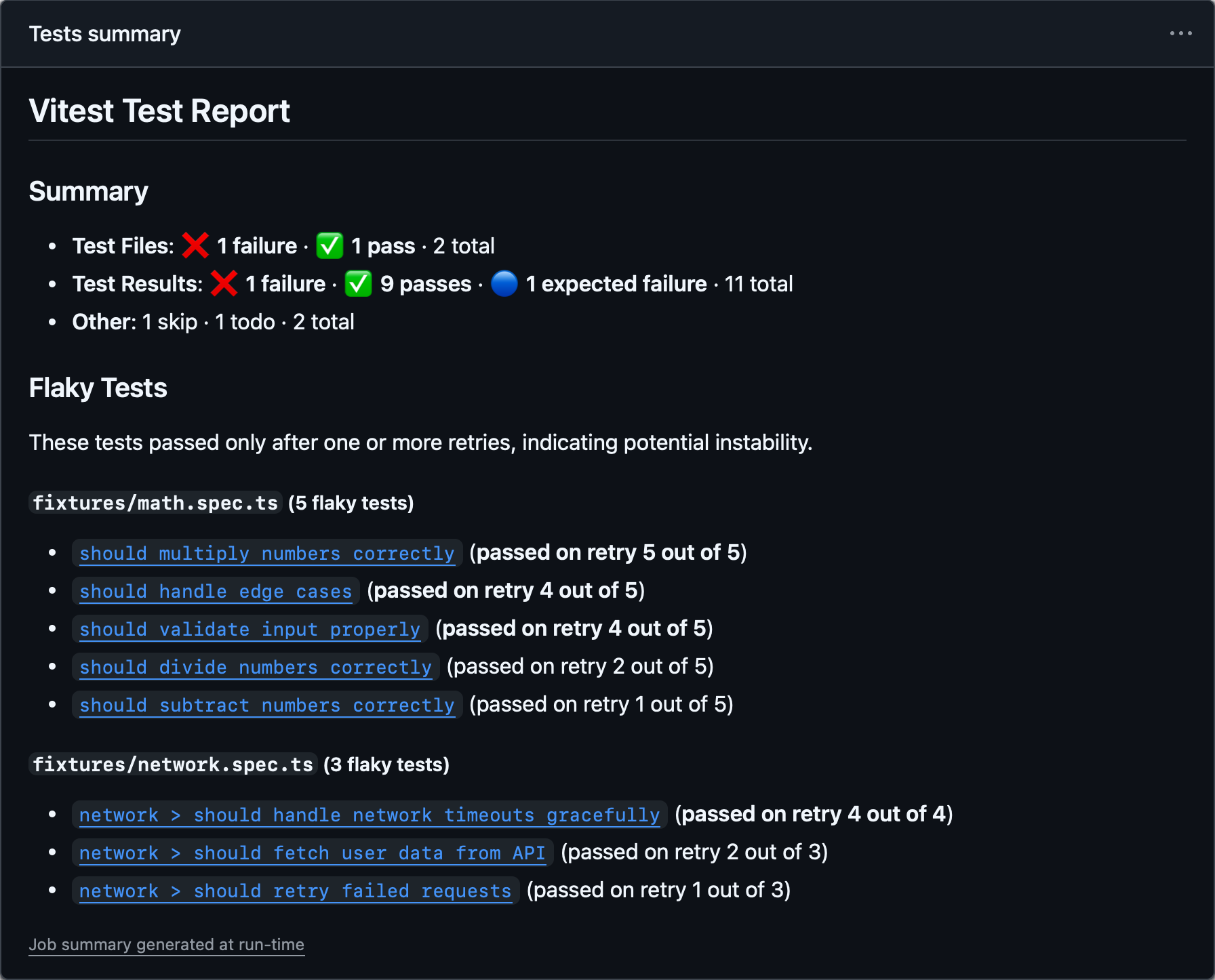
The job summary is enabled by default and writes to the path specified by $GITHUB_STEP_SUMMARY. You can override it by using the jobSummary.outputPath option:
export default defineConfig({
  test: {
    reporters: [
      ['github-actions', {
        jobSummary: {
          outputPath: '/home/runner/jobs/summary/step',
        },
      }],
    ],
  },
})
To disable the job summary:
export default defineConfig({
  test: {
    reporters: [
      ['github-actions', { jobSummary: { enabled: false } }],
    ],
  },
})
The flaky tests section of the summary includes permalink URLs that link test names directly to the relevant source lines on GitHub. These links are generated automatically using environment variables that GitHub Actions provides ($GITHUB_REPOSITORY, $GITHUB_SHA, and $GITHUB_WORKSPACE), so no configuration is needed in most cases.
If you need to override these values — for example, when running in a container or a custom environment — you can customize them via the fileLinks option:
repository: the GitHub repository inowner/repoformat. Defaults toprocess.env.GITHUB_REPOSITORY.commitHash: the commit SHA to use in permalink URLs. Defaults toprocess.env.GITHUB_SHA.workspacePath: the absolute path to the root of the repository on disk. Used to compute relative file paths for the permalink URLs. Defaults toprocess.env.GITHUB_WORKSPACE.
All three values must be available for the links to be generated.
export default defineConfig({
  test: {
    reporters: [
      ['github-actions', {
        jobSummary: {
          fileLinks: {
            repository: 'owner/repo',
            commitHash: 'abcdefg',
            workspacePath: '/home/runner/work/repo/',
          },
        },
      }],
    ],
  },
})
Minimal Reporter
- Alias:
agent
Outputs a minimal report containing only failed tests and their error messages. Console logs from passing tests and the summary section are also suppressed.
Agent Reporter
This reporter is well optimized for AI coding assistants and LLM-based workflows to reduce token usage. It is enabled automatically when Vitest detects it is running inside an AI coding agent.
npx vitest --reporter=minimalexport default defineConfig({
test: {
reporters: ['minimal']
},
})Blob Reporter
Stores test results on the machine so they can be later merged using --merge-reports command. By default, stores all results in .vitest/blob/ folder, but can be overridden with --outputFile or --outputFile.blob flags.
npx vitest --reporter=blob --outputFile=reports/blob-1.jsonWe recommend using this reporter if you are running Vitest on different machines with the --shard flag or across multiple environments (e.g., linux/macos/windows). All blob reports can be merged into any report by using --merge-reports command at the end of your CI pipeline:
npx vitest --merge-reports=reports --reporter=json --reporter=defaultWhen running the same tests across multiple environments, use the VITEST_BLOB_LABEL environment variable to distinguish each environment's blob. Vitest reads labels at merge time and displays results separately:
VITEST_BLOB_LABEL=linux vitest run --reporter=blobYou can also provide the label via the blob reporter option. This has higher priority than VITEST_BLOB_LABEL.
import { defineConfig } from 'vitest/config'

export default defineConfig({
  test: {
    reporters: [
      ['blob', { label: 'linux' }],
    ],
  },
})
Blob reporter output doesn't include file-based attachments. Make sure to merge attachmentsDir separately alongside blob reports on CI when using this feature.
TIP
Both --reporter=blob and --merge-reports do not work in watch mode.
Custom Reporters
You can use third-party custom reporters installed from NPM by specifying their package name in the reporters' option:
npx vitest --reporter=some-published-vitest-reporterexport default defineConfig({
test: {
reporters: ['some-published-vitest-reporter']
},
})Additionally, you can define your own custom reporters and use them by specifying their file path:
npx vitest --reporter=./path/to/reporter.tsCustom reporters should implement the Reporter interface.